Codepit Get Codepit
>_ A desktop workbench for Claude Code · Windows and macOS

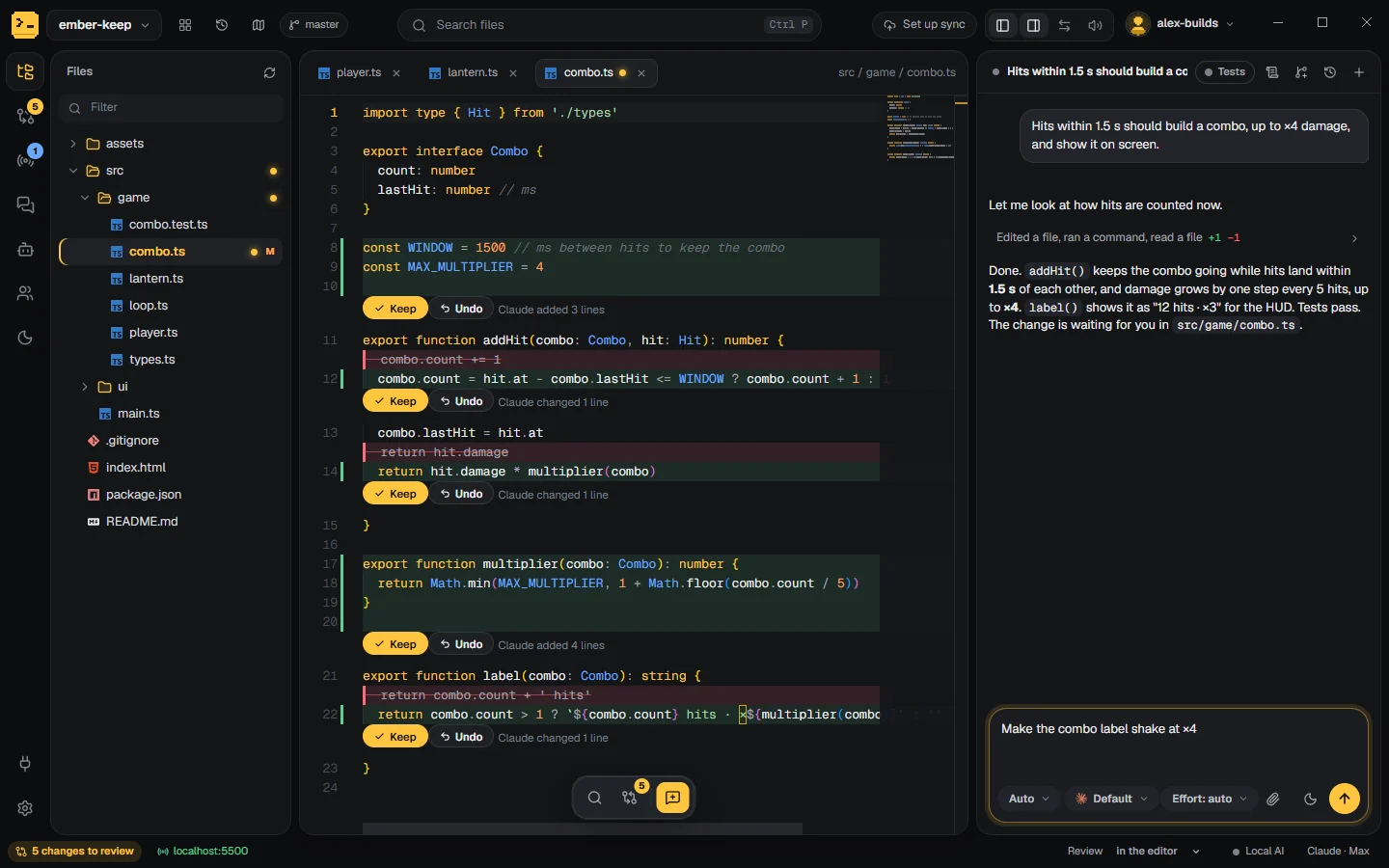
See every change Claude makes, while it works

Your project on the left, the editor in the middle, your own Claude Code session on the right. Each edit lands as a change you keep or undo, and Claude never stops to wait for your click.

Runs the Claude Code you already have, on your own Pro or Max plan. No second AI subscription.

Codepit with a sample coffee shop project: the file tree, total.ts open in the editor with three changes from Claude marked in green and red, each with Keep and Undo, and the chat where Claude explains that orders under 50 dollars now pay 4.95 shipping and the tests pass.
A sample project. Claude added shipping to the cart total and ran the tests. Its three changes wait in the editor, each with Keep and Undo.
WHY IT EXISTS

Claude Code is great at the work. Seeing the work is harder.

The terminal shows the chat, not the project

Files change somewhere off screen, and you read a summary of the code instead of the code.

Review gets in the way

Diffs open as new tabs, steal the focus, or stop the run until you approve each one.

The chat stays on one computer

Open the same project on your laptop and the conversation, and everything Claude knew, is gone.

HOW IT WORKS

Three steps, and the second one is Claude's

  1. Open a folder

    Or describe a new project, or clone one from GitHub. Codepit finds the Claude Code you have installed and signed in to.

  2. Ask in the chat

    Claude reads, edits and runs commands. Each step shows in plain words, and its plan stays pinned at the top and ticks off as it goes.

  3. Review as it lands

    Keep or undo each change in the editor or in the review list (Ctrl Shift R). Or switch review off and let git be the review.

FEATURES

What Claude Code users keep asking for, built in

Each of these started as a wish people wrote down: in issues, forum threads and comments about working with Claude Code every day.

Preview › pointer

Point at it, say what to change

Open your page in the built-in preview, click the pointer, then click the thing you want different and say how. Claude gets that exact element: where it sits, its text, HTML and styles, a cropped screenshot, and the file it most likely comes from.

Point at several things before you send. Works on a running dev server and on a plain HTML file.

A page preview with the Buy now button picked and numbered 1, and a card under it naming button#buy, its text and index.html, with the request: make it bigger and say Order now.
Team

Live with your team

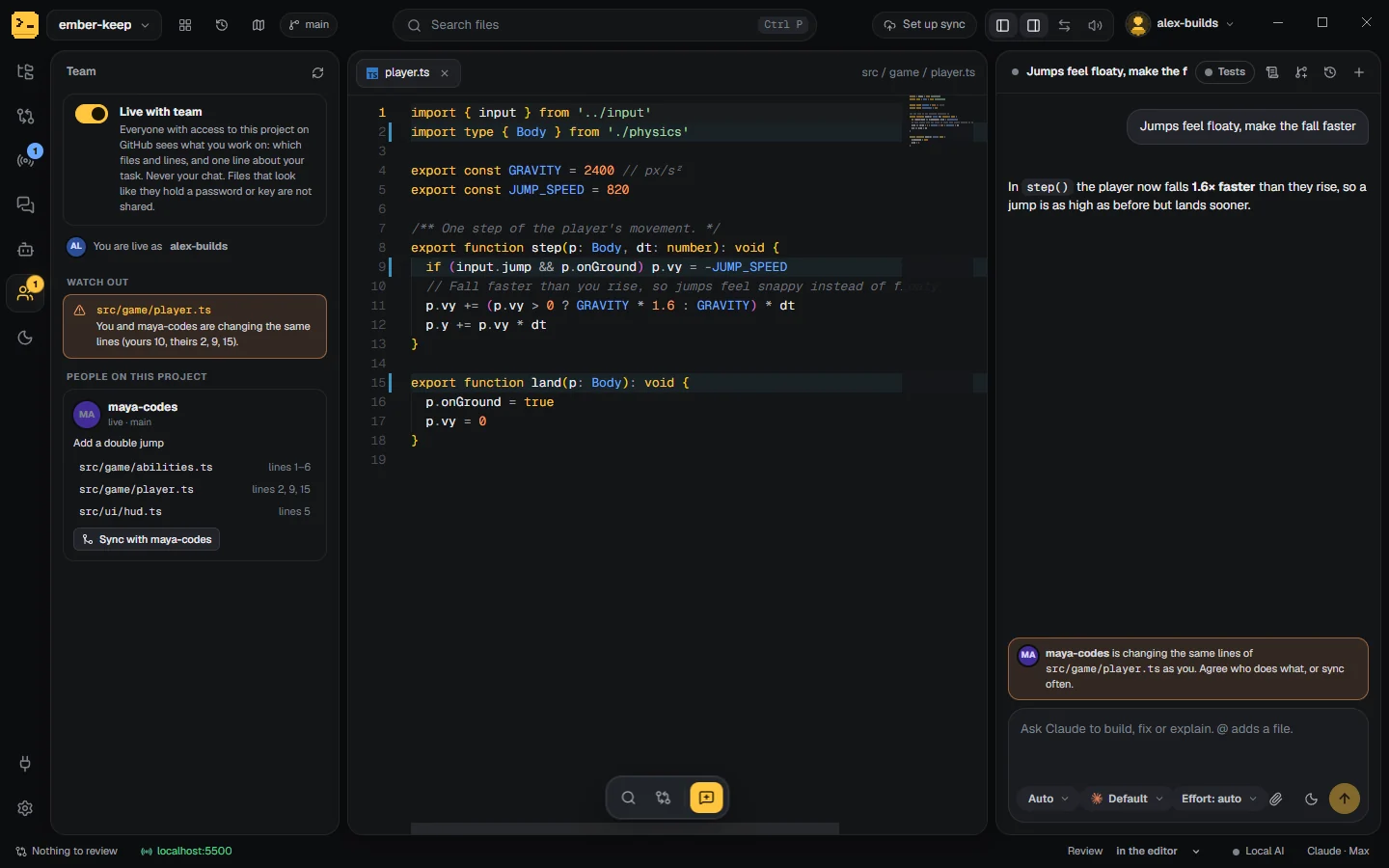
Turn it on in a project on GitHub and see who else is working in it right now: which files, which lines, and what for. Their initials show in your file tree and their lines in your editor.

Codepit warns you, and your Claude, before two people change the same lines. Sync with brings a teammate's work into yours, file by file, for you to review; Claude settles the clashes.

It goes through your project's own GitHub. Chats are never shared, and files that look like they hold a key stay on your computer.

Bob's Codepit: app.ts and menu.ts carry Alice's initials in the tree, line 10 is marked in the editor as hers, and the chat warns that Alice is changing the same lines of app.ts.
Project map

A map of your code, for you and for Claude

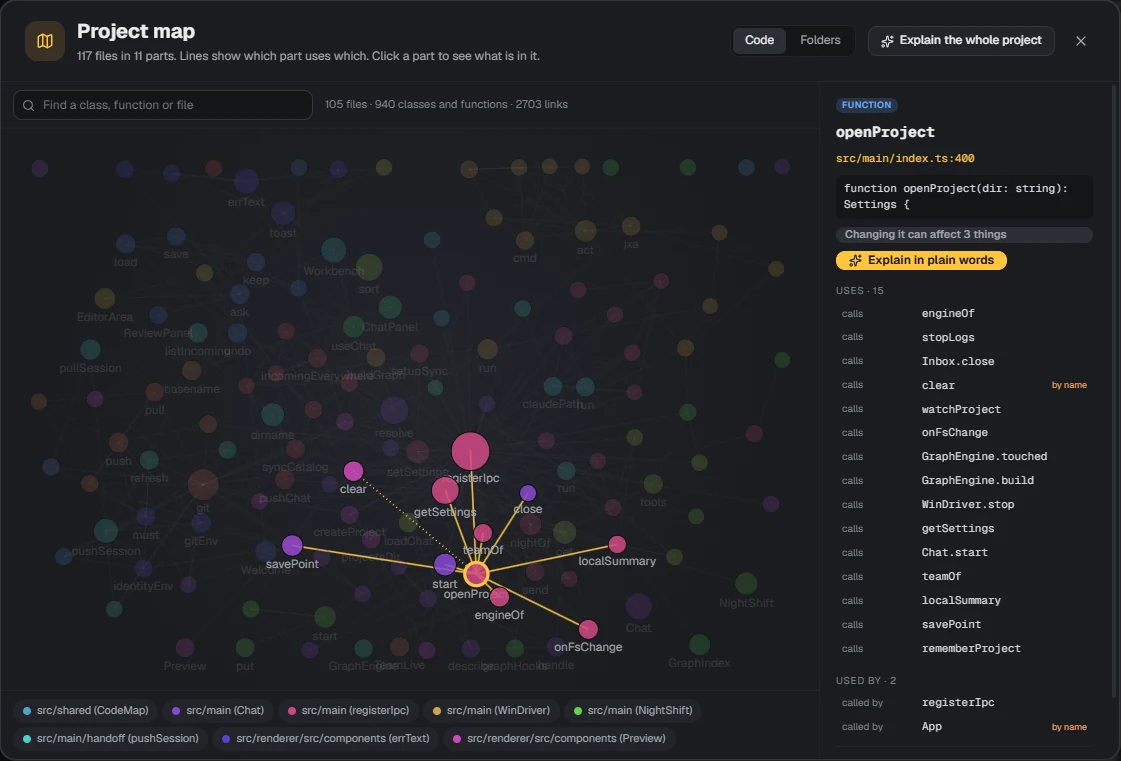
Codepit reads every class and function and how they call each other, in 12 languages. Claude asks the map before it searches and checks what a change would touch, so it gets lost less in big projects.

Click any part to see what it uses, what uses it, and an explanation in plain words.

The project map: functions as dots joined by lines, gravity selected, used by Player.jump and score, with Explain in plain words.
Night shift

Leave Claude a list for the night

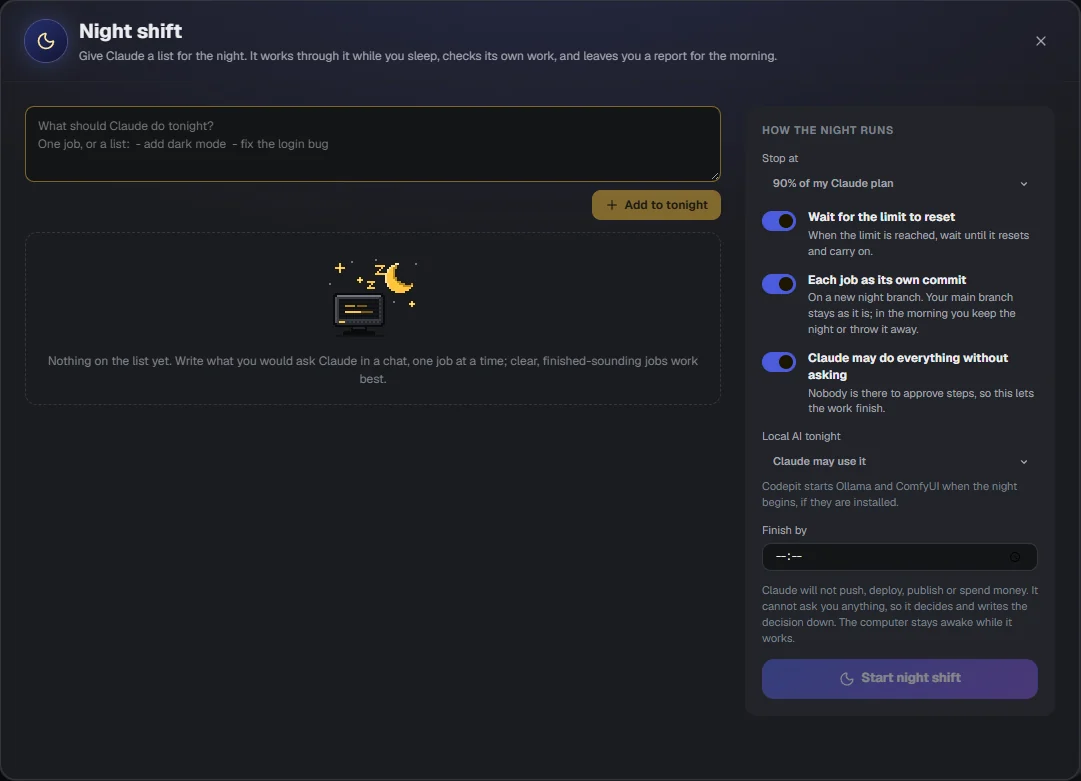
Write the jobs before bed. Claude works through them one by one, checks its own work, and puts each job in its own commit on a night branch. In the morning you read the report and keep the night or throw it away.

It watches your plan limit and stops or waits for the reset. It never pushes, deploys or spends money.

The night shift window: a box for tonight's jobs and settings for how the night runs, such as stop at 90 percent of my Claude plan and each job as its own commit.
Settings › Local AI

Small jobs on your own computer

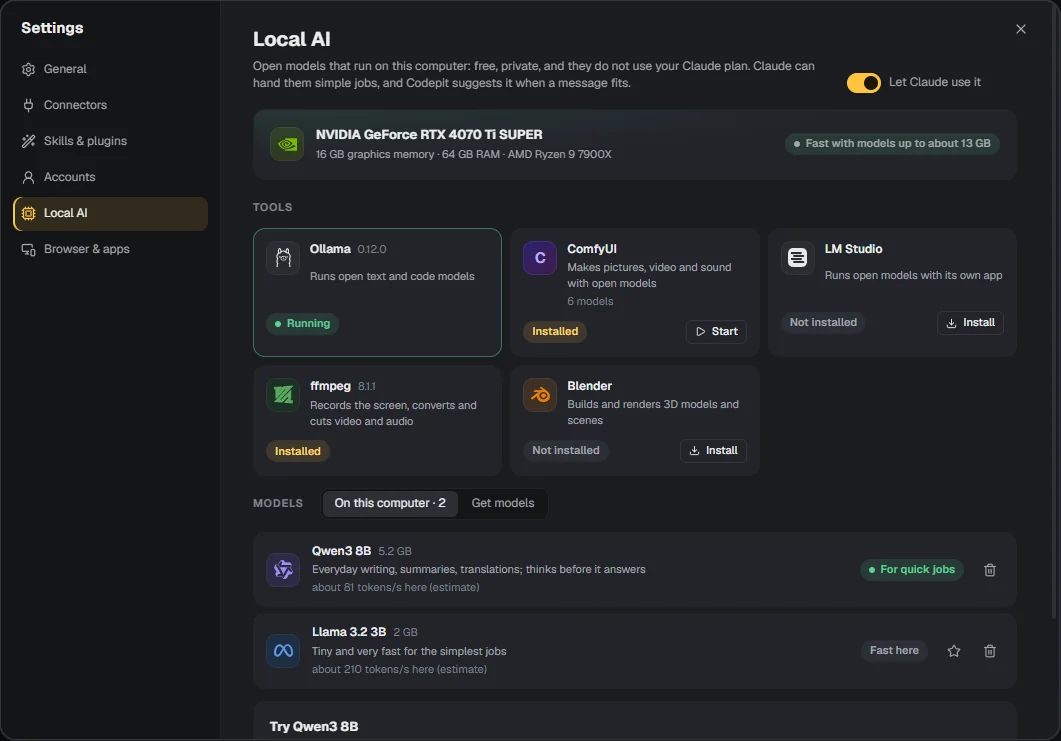
Codepit shows what your graphics card can run and which open models fit it. Claude can hand simple jobs, like a summary, a translation or a picture made with ComfyUI, to a model on your computer: free, private, and off your plan.

Settings, Local AI: the graphics card and how big a model it runs fast, local tools such as Ollama, ComfyUI, ffmpeg and Blender, and the models on this computer.
AND THE EVERYDAY THINGS

Everything else you reach for in a day

Sync

Same chat on your PC and your Mac

Open the project on your other computer and carry on in the same conversation, with your unfinished code. It travels through a private repo on your GitHub.

History

One history with the terminal

Codepit uses the chats Claude Code keeps, so claude --resume and Codepit see the same conversations.

Chats › tabs

Several chats at once

Tabs above the chat, topic chats for UI or backend, chats that hand each other tasks, and a panel with every agent at work.

Time travel

Go back to any moment

Slide back to the project before or after any Claude turn, see what changed since, and bring it back with one click.

Chat › Tests

Tests on one click

The button runs the project's tests. The dot turns green or red, and Ask Claude to fix sends the failure.

Error catcher

Errors become a “Fix it”

An error in the page preview or in the log of a server Claude started shows up as a card. One click hands it to Claude.

Code | Preview

Files as they look

Pictures, Markdown, CSV tables, SVG, PDF and HTML pages open as they look, with a switch back to the code.

Preview › phone

Your page on your phone

A QR code next to the preview opens the same page on your phone, on the same Wi-Fi.

Chat › paperclip

Any file in the chat

Drop or paste screenshots, PDFs, logs and folders. Mention project files with @ and they show as chips.

Rules

Rules for Claude, in plain words

Your CLAUDE.md as a list of rules: for this project, just for you, or for every project.

Browser & apps

Your Chrome, your computer

Let Claude work in your own Chrome, or click and type on this computer, with a Stop bar always on top.

All projects

Every project at a glance

Every project and every chat at work right now, including Claude Code in a terminal in another folder. One click switches.

QUESTIONS

Before you try it

Do I need a Claude subscription?

Yes. Codepit runs the Claude Code you have installed and signed in to, with your own account and plan. Codepit has no AI and no account of its own.

Is Codepit made by Anthropic?

No. Codepit is an independent app that works with Claude Code. It is not made, endorsed or supported by Anthropic.

Where does my code go?

Nowhere new. Claude Code talks to Claude the same way it does in the terminal. Moving a chat to another computer and working live with a team go through your own GitHub, and only when you turn them on.

Do I have to give up the terminal?

No. The chats are the same ones Claude Code keeps, so you can start in Codepit and go on with claude --resume, or the other way round.

Which systems does it run on?

Windows and macOS.

What does it cost?

Codepit is in private testing and has no price yet. You pay for Claude as you do today.

VERSION 0.11.0

Codepit is in private testing

Builds for Windows and macOS go to testers for now. Public downloads are not open yet.

Windows macOS Needs Claude Code